Using the Member Directory
The GovRAMP Member Directory is a dynamic, searchable tool that allows members to connect with one another, fostering collaboration and networking within the community. This guide will help you navigate and utilize the directory effectively.
Accessing the Member Directory
- Log into the Member Portal:
- Navigate to the GovRAMP Member Portal.
- Enter your credentials to sign in.
- Navigate to the Directory:
- On the Member Portal Home, locate and click on the “Community Directory” link in the top right corner.
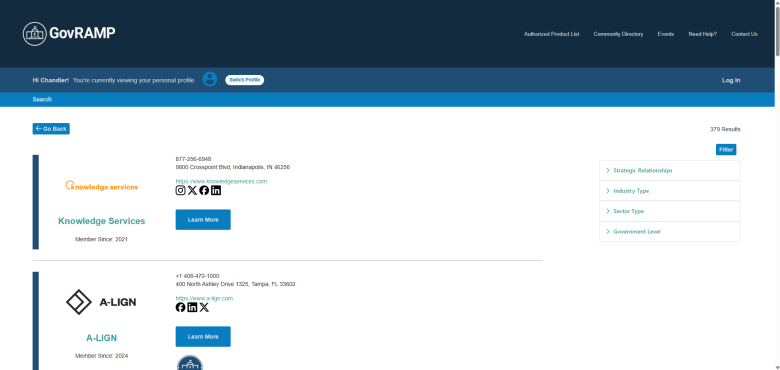
Searching for Members
Basic Search:- Use the search bar to enter keywords such as member name, organization, or industry. The system will search across profile names, category names, listing keywords, and products and services.
- Select a specific category from the dropdown menu next to the search bar to filter results by predefined categories.
- Click on the “Filter” option to refine your search using criteria such as committee members, collaborative relationships, industry type, membership level, sector type, and government level. Please find the full filter options below.
| Filter | Description |
| Strategic Relationships
Useful for identifying vendors, alliances, or public-sector groups with deeper collaborative ties. |
|
| Industry Type
Enables segmentation by role within the compliance ecosystem. |
|
| Sector Type
Helps users easily differentiate between vendors and government entities. |
|
| Government Level
Useful for understanding jurisdictional reach and aligning collaboration opportunities by level of government. |
|
Viewing Results and Organization Profiles
- Directory results display based on your search and filter criteria.
- Click on any organization name to view its full profile, including contact information, listed services, and strategic relationships.
- Profiles are updated and maintained by each member organization through the GovRAMP Portal.
Need Help?
If you have questions about the Member Directory or want to update your organization’s listing, contact: olivia@stateramp.org